How to Audit Your Brand Presence in AI Answer Engines (AEO Step-by-Step Framework)
sameAs entity graph.
Why Every Marketing Team Needs an AI Answer Engine Brand Audit
In legacy search, if a prospect searched for your product category and you ranked #4 on Page 1, you still captured a predictable share of impressions and clicks. In AI answer engines—including ChatGPT Search, Perplexity AI, Google AI Overviews, Claude, and Microsoft Copilot—visibility is largely binary: either your brand is synthesized into the primary answer and cited as a trusted footnote, or you are completely invisible.
Test any URL against 24 deterministic Answer Engine Optimization rules in 30 seconds using our Free AEO Audit Tool.
Even more dangerous than invisibility is attribute hallucination: an answer engine mentioning your brand but quoting outdated 2023 pricing, claiming you lack a critical integration you launched last year, or positioning your enterprise platform as "for beginners only." Knowing how to audit brand presence in AI answer engines (AEO) gives you deterministic control over your brand narrative across every major LLM.
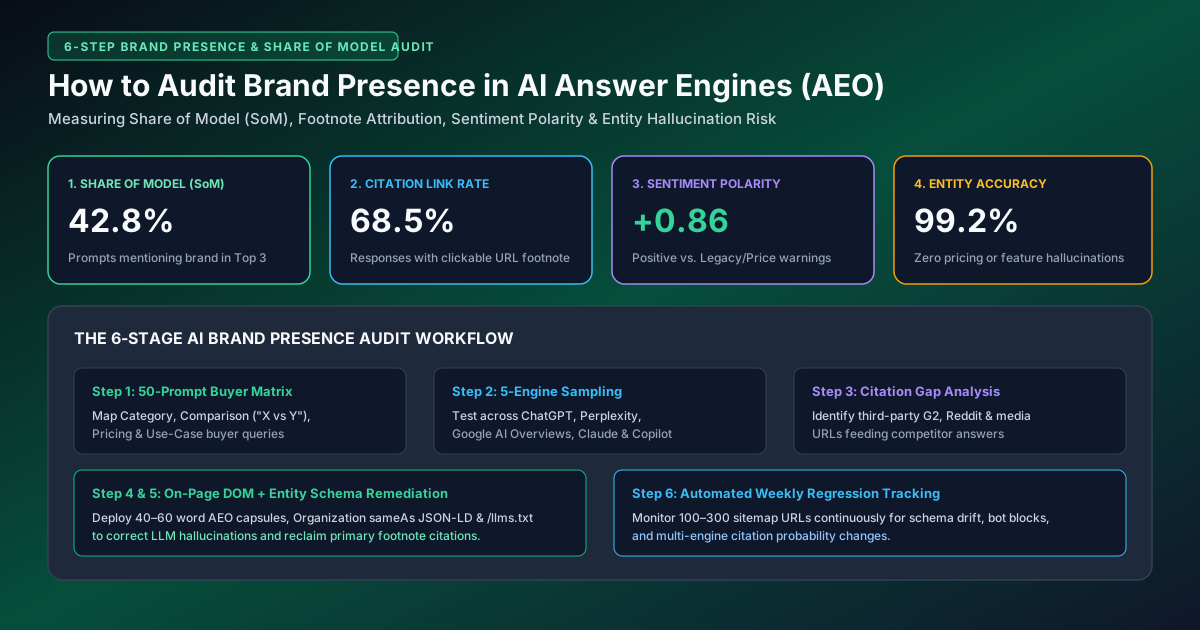
The 5 Core KPIs of an AEO Brand Presence Audit
Before running prompt tests or crawling your domain, standardize your audit around these five quantitative metrics:
| AEO Brand Visibility KPI | Mathematical Definition / Formula | Healthy Benchmark Target | Diagnostic Tool Used |
|---|---|---|---|
| 1. Share of Model (SoM %) | (Prompts Mentioning Your Brand ÷ Total Category Prompts Tested) × 100 |
≥45% for Category Leaders; ≥25% for Challengers | Multi-Engine AI SERP Simulator |
| 2. Footnote Citation Rate (%) | (Responses Linking Directly to Your Domain ÷ Total Responses) × 100 |
≥30% across Perplexity & Google AI Overviews | Free AEO Audit Tool |
| 3. Attribute Accuracy Score | Percentage of AI responses stating accurate current pricing, features & ICP | ≥95% Factual Accuracy (Zero Hallucinations) | Entity Schema & /llms.txt Validator |
| 4. Recommendation Rank (1–5) | Average ordinal position when an LLM lists top solutions in your category | Position #1 or #2 in bulleted syntheses | Competitor AI Gap Matrix |
| 5. On-Page AEO Readiness (0–100) | Deterministic score across 40–60 word capsules, question headings & FAQ schema | ≥90 / 100 across all commercial money pages | Batch Sitemap Audit Runner |
Step-by-Step: How to Audit Brand Presence in AI Answer Engines
Step 1: Construct a 50-Prompt Buyer Intent Matrix (4 Intent Tiers)
Do not test single-word keywords. Build a structured 50-prompt test suite spanning four real-world conversational buyer stages:
Step 2: Test Across the Big 4 Answer Engines & Log Raw Verbatim Outputs
Run your prompt matrix across Google AI Overviews, ChatGPT Search, Perplexity AI, and Claude—or simulate your URLs directly inside the AI SERP Simulator. Record whether your brand is mentioned, whether your URL is attached as a clickable footnote citation, and which specific competitor or third-party URLs the engine cites instead.
Step 3: Audit the "Whisper Network" (Third-Party Citation Sources)
When you inspect the footnote citations inside Perplexity or ChatGPT Search, you will notice that roughly 60% of citations point to first-party vendor pages and 40% point to third-party consensus sources—such as G2, Capterra, Trustpilot, Reddit threads, Wikipedia/Wikidata, and industry buyer's guides. If your brand is absent from the top 5 industry listicles or lacks fresh G2 reviews, LLMs will down-weight your self-published claims.
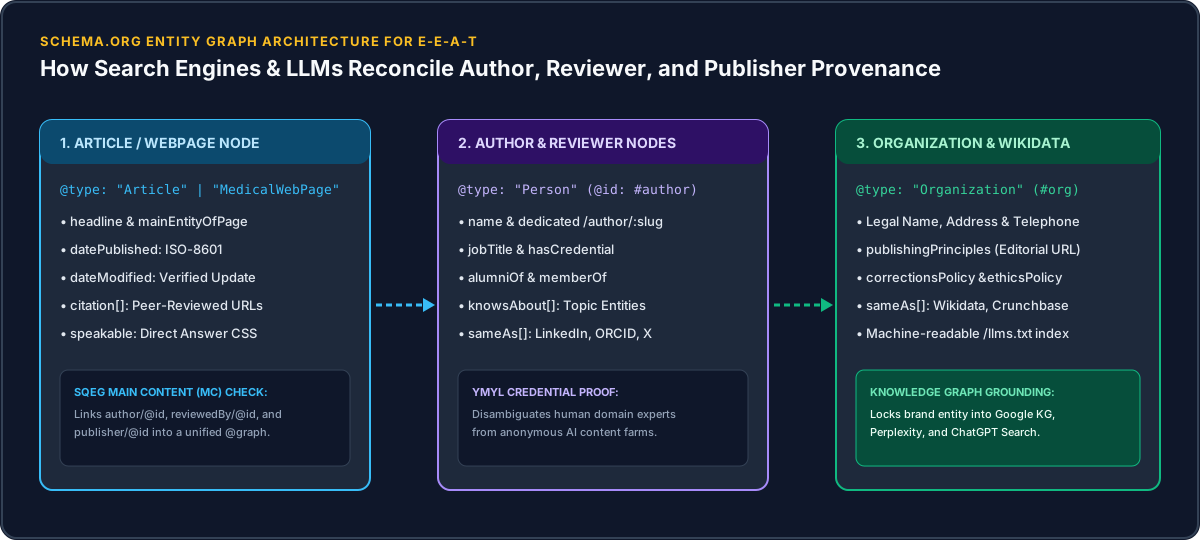
Step 4: Run a Deterministic On-Page AEO & Entity Schema Audit
Whenever an answer engine fails to cite your domain—or hallucinates outdated product details—the root cause is almost always on your own website. Run your homepage, pricing page, and core product pages through the Free AEO Audit Tool and E-E-A-T Checker to fix:
Frequently Asked Questions About Auditing Brand Presence in AEO
How can I fix false or outdated information ChatGPT says about my brand?
First, publish a clear, crawlable "Canonical Brand Facts, Pricing & Specifications" section using a native HTML <table> and FAQPage JSON-LD on your official website. Second, list those canonical URLs in your root /llms.txt file and verify that OAI-SearchBot and PerplexityBot are unblocked in /robots.txt. Third, update any outdated pricing or feature descriptions on third-party directories (G2, Capterra, Crunchbase) that the LLM is citing as its source.